

AI Image Studio · Change Camera
Change Camera Angle With AI: New Views of Any Photo
One photo, many shots. Place virtual cameras around your subject in 3D (low, high, side, close) and the scene is rebuilt from each angle in a single run.
About the Camera Angle Changer
A single photo only shows one side of the scene. The camera studio treats it as a set: you place one or more virtual cameras around the subject, choose height, direction and lens, and each camera returns a new image of the same subject and setting from that viewpoint.
It is how you turn one product shot into a front, three-quarter and top-down set, give a character a matching close-up and wide shot for a storyboard, or find a stronger angle for a thumbnail without reshooting.
Before and after
Real results from the tool above. Originals on the left, output on the right.
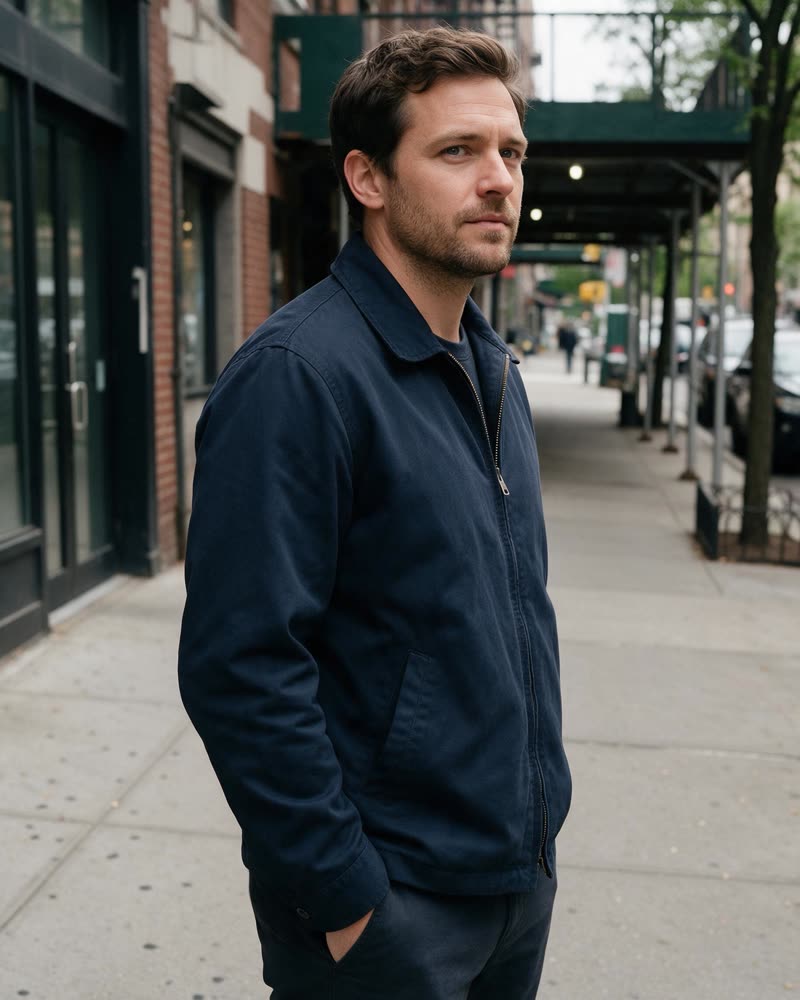 Before
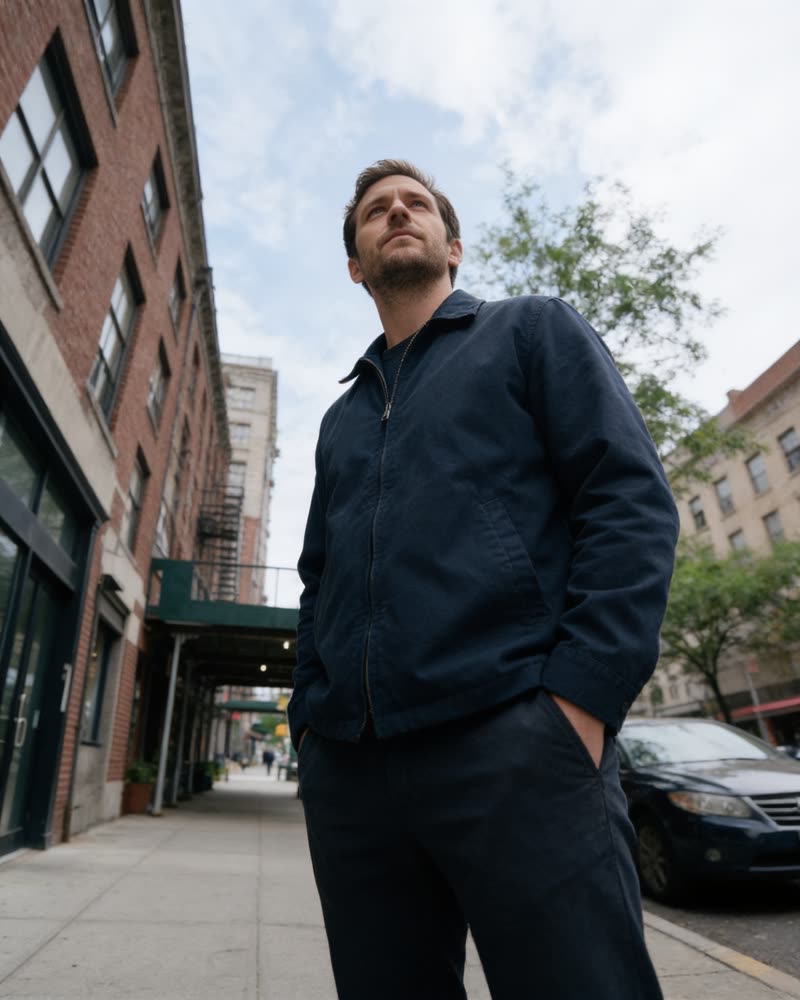 AI-generated
Eye level to hero low angle
“Low angle looking up… same man, same outfit.”
Angles that work
Add one of these as the instruction for a camera, or pose the cameras visually and use the text to fine-tune.
Hero low angle
Low angle looking up at the subject, slight wide lens, sky visible behind. Same subject, same outfit, same lighting direction.
Top-down flat lay
Straight overhead view of the table, everything in the same positions, soft even light.
Three-quarter product view
Rotate the camera 45 degrees to the left of the product at the same height, showing the front and one side.
Tight close-up
Close-up on the subject’s face from the same side, shallow depth of field, background softly blurred.
Wide establishing shot
Pull the camera far back to show the whole room around the subject, same time of day.
Over-the-shoulder
Camera behind the subject’s right shoulder looking toward what they are facing.
Get any angle from a single photo
Place cameras, not prompts. Below: how the camera studio works, what people use it for, and how to keep the subject consistent across views.
How it works
- 1
Upload one photo
A product, a person, a room or a scene. A clear, well-lit photo works best.
- 2
Place the cameras
Drag virtual cameras around the subject in 3D and set height and lens, or describe the angle in words. 2 credits per image.
- 3
Get every view
Each camera returns its own image of the same subject and setting. Download the ones you want.
What you can use it for
Product image sets
Front, side, three-quarter and top-down views for a listing from a single shot.
Storyboards
Matching wide, medium and close-up frames of the same character and set.
Start frames for video
Pick the strongest angle before animating it into a clip.
Real estate and interiors
Alternative viewpoints of a room to show layout and flow.
Features
- Virtual cameras placed in 3D around your subject
- Several angles in one run
- Low, high, side, top-down and close-up views
- Subject, outfit and setting kept consistent
- Text instructions to fine-tune each view
- Results go straight to the editor or to video
Tips for the best results
- Small moves keep the most detail. A 30–60 degree turn is more faithful than a full reverse angle.
- Keep the lighting direction in the instruction ("same lighting direction") so views match.
- For products, photograph the original straight on; it gives the model the most information.
- Generate a close-up and a wide from the same photo to cut between them in a video.
Why change the angle with AI
Reshooting costs a session; changing the angle costs 2 credits. The camera studio keeps the subject, outfit and setting consistent across views, so a single good photo becomes a matching set. It lives in the same studio as the editor, relight and the video tools, and every result is marked as AI-generated.
Frequently asked questions
How do I change the camera angle of a photo?
Upload the photo above, place one or more virtual cameras around the subject (or describe the angle), and generate. Each camera returns a new view of the same scene.
How many angles can I get at once?
You can pose several cameras in one run and receive one image per camera.
Will the subject stay the same?
The tool is built to keep the subject, clothing and setting consistent. Smaller angle changes preserve the most detail.
How much does it cost?
2 credits per image, shown before you confirm.
Can I animate the new angle?
Yes. Send any result to AI Video Pro as the start frame of a clip.
Whose photos can I use?
Your own photos, products and places, and photos of adults who have agreed to it. GoCrazyAI is for adults (18+) and uploads are checked automatically.
Explore more AI photo tools
Image Editor
Edit any photo with a text prompt
3D Model Generator
Photo to 3D model, GLB & STL
Image to STL
Photo to a print-ready STL
Text to 3D
Describe it, get a 3D model
3D Game Assets
Low-poly props from one image
AI Headshots
Pro headshots from a selfie
AI Interior Design
Redesign any room from a photo
Object Remover
Brush away anything in a photo
Image Extender
Uncrop & expand any photo
Photo Restoration
Restore & colorize old photos
Background Remover
Transparent PNG in one click
Skin Enhancer
Natural one-click retouch
Mockup Generator
Your design on any product
See the full AI image tools collection or open the AI Image Studio.