


Text to 3D Prompts: A Simple Formula and 20 Examples to Try
Write text to 3D prompts that produce clean, printable models: a four-part formula, 20 copy-ready examples, and the prompt mistakes that turn objects into messy scenes.
 AI-generated
Quick Answer
Write text to 3D prompts as one sentence with four parts: the object, its main parts, its material and its style. For example: "a vintage brass telescope on a wooden tripod, polished metal and dark wood". Leave out rooms, backgrounds and text, which the engine would try to model. Keep it to one or two sentences.
Why do text to 3D prompts work differently from image prompts?
An image prompt only has to look right from one angle. A 3D model has to make sense from every angle, and the engine builds it in two stages: it first imagines the object from your words, then reconstructs it as a textured mesh. Anything extra in the prompt, such as a table, a room or a sky, gets pulled into that mesh. So 3D prompts reward focus: one object, clearly described.
The four-part prompt formula
- Object: name one thing plainly. "A vintage telescope", not "an astronomy setup".
- Parts: list the parts you care about. "On a wooden tripod, with a brass eyepiece." Each named part usually gets modelled.
- Material: brass, oak, ceramic, painted tin, marble, leather. Material words shape the colour, roughness and metal maps; the PBR overview explains what those maps do.
- Style: realistic, stylized, toy, miniature, low-poly. The style word sets proportions and how much detail is modelled.
 AI-generated
Examples: 20 text to 3D prompts to copy
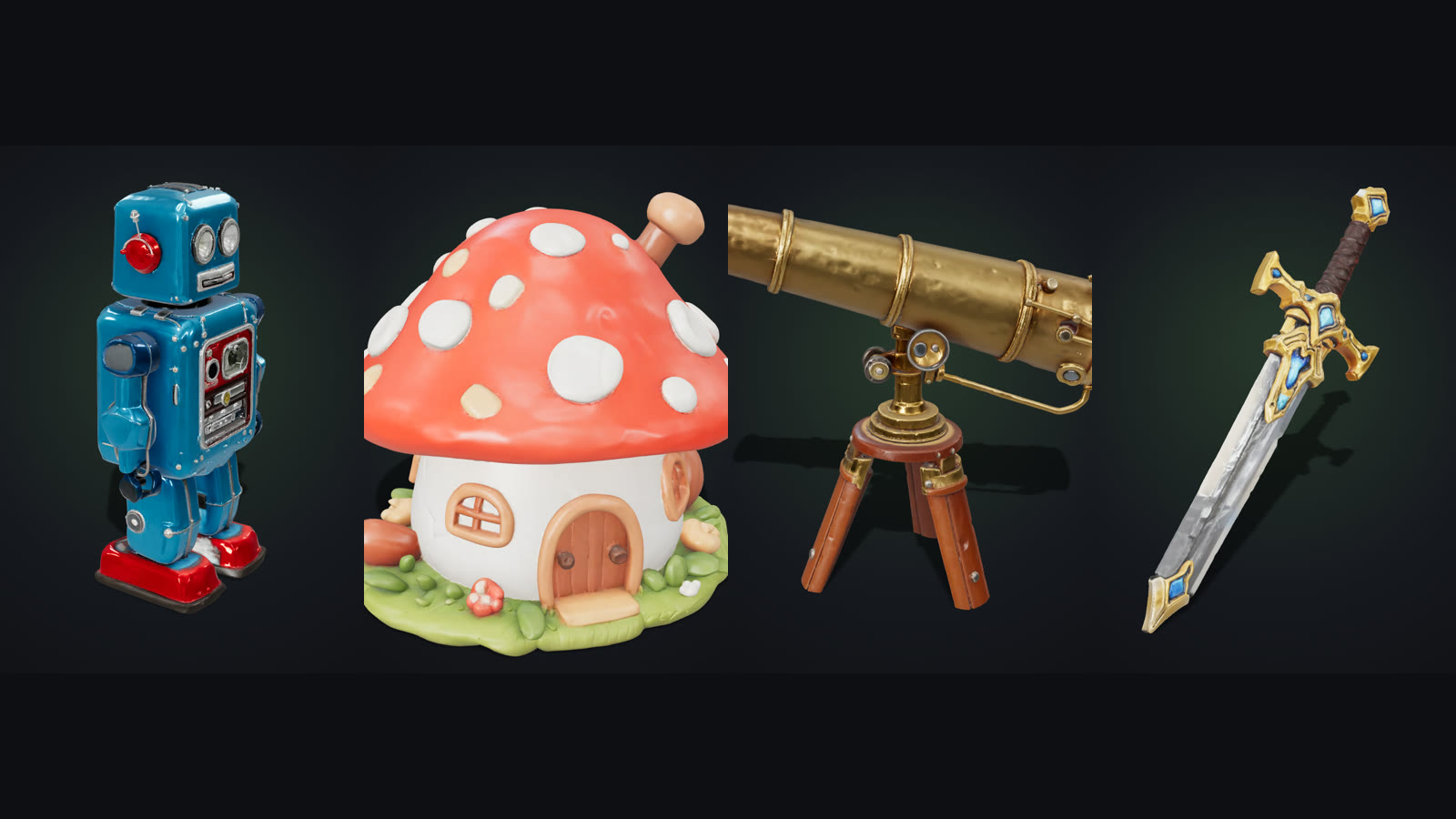
We generated the first four for this article; the rest follow the same formula.
- a retro tin robot toy with round glass eyes, two antennas, a dial on its chest and red feet, painted metal
- a cute fairy mushroom house with a red spotted roof, a round wooden door and tiny windows, ceramic miniature
- a vintage brass telescope on a wooden tripod, polished metal and dark wood
- an ornate fantasy sword with a gold crossguard, a leather-wrapped grip and a glowing blue gem in the pommel
- a wooden treasure chest with iron bands and a heavy padlock, stylized game prop
- a small succulent in a round terracotta pot with pebbles on the soil
- a chess knight piece carved from white marble, classic Staunton style
- a weathered viking helmet with a nose guard and riveted iron bands
- a 1960s rangefinder film camera, black leatherette and chrome, detailed lens
- a soft pink axolotl plush toy with fluffy gills and a happy face
- a sci-fi cargo crate with glowing orange panels, hazard stripes and handles, game asset
- a small green dragon perched on a mossy rock, wings folded, collectible figurine
- an old iron oil lantern with a glass chimney and a carrying handle
- a stylized low-poly pine tree with layered branches on a small round base
- a ceramic owl figurine with big round eyes, glazed teal and cream
- a steampunk pocket watch with exposed brass gears and a chain
- a stone gargoyle sitting on a pedestal, weathered granite, gothic style
- a cozy armchair with tufted green velvet and wooden legs, realistic furniture
- a stylized hot air balloon with a striped canopy and a wicker basket, toy style
- a potion bottle with a cork stopper, swirling purple liquid and a leather label, game prop
The first four took one generation each, with no editing. You can see them rotating on the Text to 3D Model page.
How to do it with GoCrazyAI
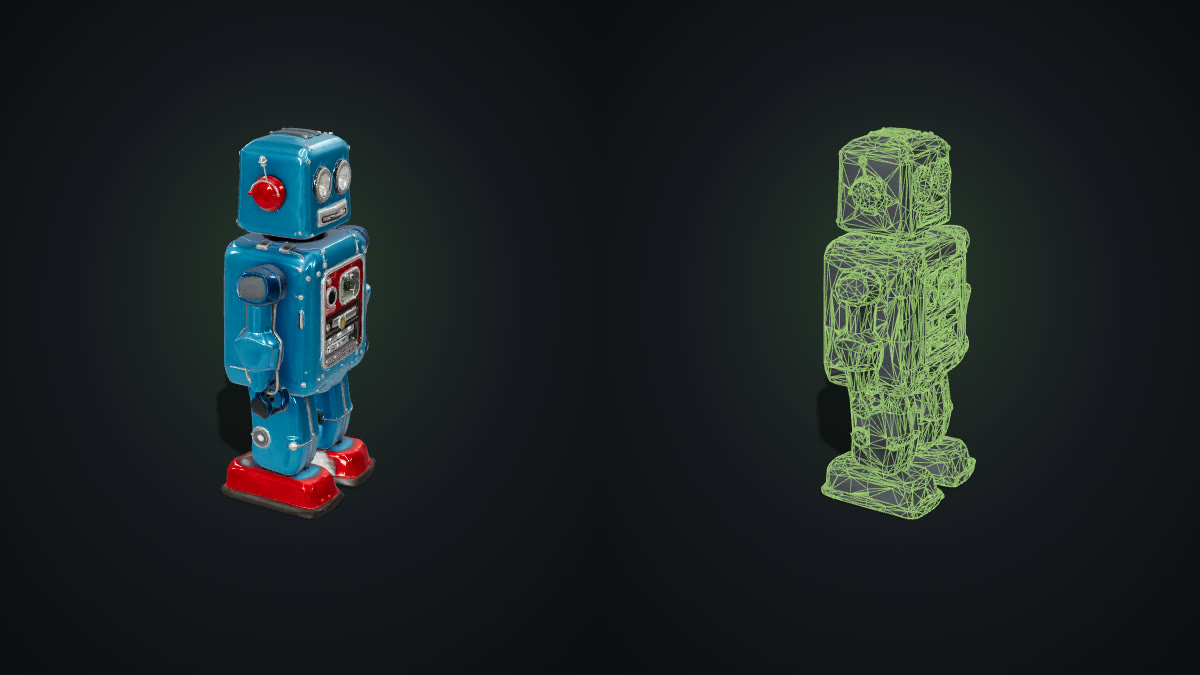
Open Text to 3D Model; it starts in Text mode on the Pro engine. Paste a prompt, generate, and in about four minutes you can rotate the model, check its wireframe and download GLB, STL, OBJ or USDZ. Turn on Ultra detail for finer geometry. The GLB download is a standard glTF 2.0 file, so it opens in Blender, game engines and web viewers. Planning to print it? Read how to 3D print a picture for slicer settings; the same steps apply to models made from text. Prefer to start from a photo? Use the main AI 3D Model Generator.
Common mistakes with 3D prompts
- Describing a scene. "A lantern on a table in a tavern" gives you a table and a room. Describe the lantern only.
- Stacking adjectives. Ten style words fight each other. Pick one style.
- Asking for text or logos. Lettering rarely survives the 3D step; add decals afterwards.
- Leaving out the material. Without it, the texture is a guess.
- Very thin objects for printing. Needles, wires and long thin blades usually need thickening before they print well.