



AI Image Studio · Print
Upscale Images for Print: 8K, 300 DPI, No Watermark
Most photos and AI images are 1 to 4 megapixels, which prints sharp only up to about postcard size. Upscale to 8K (33 megapixels) and the same image holds up on A3, 16 × 20 in and poster prints.
About the Upscale Image for Print
Printing exposes every missing pixel. A 1024-pixel AI image looks great on a phone and turns soft and blocky on an 8 × 10 in print, because a print lab needs about 300 dots per inch for a sharp result. The fix is not stretching the image in an editor, which only enlarges the blur, but upscaling it with AI so the extra pixels carry real detail.
The table and calculator below show exactly which upscale size you need for each print size, so you do not pay for 8K when 4K is enough, and you know before you order when a poster will be sharp from across the room rather than up close.
Before and after
Real results from the tool above. Originals on the left, output on the right.
 Before
 AI-generated
Illustration for a poster
8K, Enhanced. A 12 % crop of the frame: helmet, suit seams and reflections hold up at poster scale.
 Before
 AI-generated
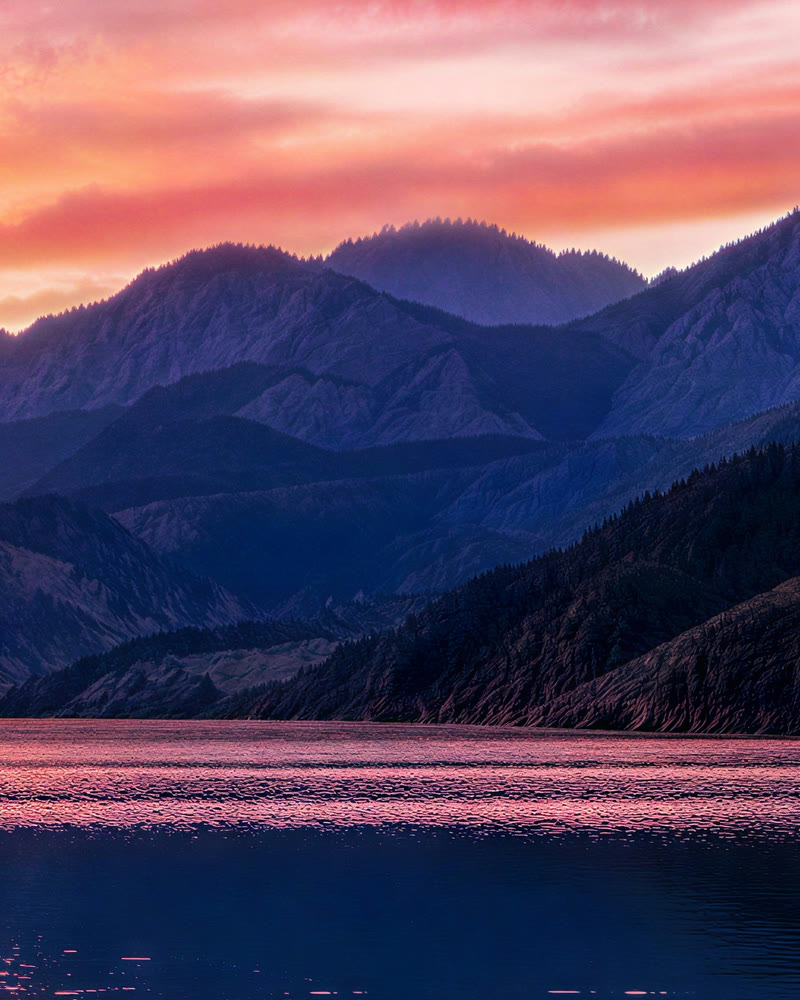
Landscape for a wall print
8K, Enhanced. Ridges, forest and water ripples sharp in a 14 % crop.
Which size for which print
Resolution each upscale size gives at common print sizes (image cropped to the print shape). 300 DPI is lab standard; 200 looks sharp at arm’s length; 150 is fine for posters seen from a few steps away.
| Print size | 2K | 4K | 8K | Smallest size for 300 DPI |
|---|---|---|---|---|
| 4 × 6 in | 408 DPI | 816 DPI | 1173 DPI | 2K (1 credit) |
| 5 × 7 in | 338 DPI | 676 DPI | 971 DPI | 2K (1 credit) |
| 8 × 10 in | 224 DPI | 447 DPI | 642 DPI | 4K (4 credits) |
| A4 (8.3 × 11.7 in) | 203 DPI | 407 DPI | 584 DPI | 4K (4 credits) |
| 11 × 14 in | 161 DPI | 322 DPI | 463 DPI | 4K (4 credits) |
| A3 (11.7 × 16.5 in) | 144 DPI | 288 DPI | 413 DPI | 8K (13 credits) |
| 16 × 20 in | 112 DPI | 224 DPI | 321 DPI | 8K (13 credits) |
| 18 × 24 in | 96 DPI | 192 DPI | 276 DPI | 8K at ~poster quality |
| 24 × 36 in | 68 DPI | 136 DPI | 195 DPI | 8K at ~poster quality |
Print size calculator
Enter your print size to see the resolution each upscale size gives you. 300 DPI is the print-shop standard; posters seen from a few steps away look fine from 150 DPI.
Assumes the image is cropped to the print’s shape. Most labs print at 300 DPI; below 150 DPI edges start to look soft up close.
Print-ready images from any source
Upload, upscale to the size your print needs, download a lossless PNG. Below: how it works, what it is used for, how to get the sharpest print and what people ask before ordering.
How it works
- 1
Upload your image
A photo, a scan or an AI image. The tool shows its real size and the exact pixels each upscale size will produce.
- 2
Pick the size your print needs
Use the table or the calculator: 4K covers A4 and 8 × 10 in at 300 DPI, 8K covers A3 and 16 × 20 in.
- 3
Download and send to the lab
Check the detail at 4× zoom, then download the full-resolution PNG. No watermark, nothing to remove.
What you can use it for
Wall art and posters
Turn a favourite photo or AI image into an A3 or 16 × 20 in print that stays sharp up close.
Print-on-demand
Most print-on-demand shops ask for 300 DPI files; an 8K upscale meets that for most shirt, mug and poster templates.
Photo books and albums
Old phone photos and scans upscaled so full-page spreads do not look soft.
Canvas and large prints
Canvas texture forgives a little, so 8K reaches 24 × 36 in at close to 200 DPI.
Flyers and menus
Low-resolution product or food photos cleaned up for A4 and A5 print runs.
Features
- Upscale to 8K (about 33 megapixels)
- DPI table and print size calculator
- Real detail instead of stretched pixels
- Faces, text and products stay the same
- Lossless PNG with no watermark
- Ready for print labs and print-on-demand
Tips for the best results
- Crop to the print shape (for example 4:5 for 8 × 10 in) before upscaling, so every pixel ends up on paper.
- Pick the smallest size that reaches 300 DPI in the table; bigger costs more without looking different in print.
- Use Enhanced for photos and art; switch to Natural for logos and anything with text that must stay exact.
- Ask your lab whether it wants PNG or high-quality JPEG. Converting the PNG to JPEG at 95 % quality loses nothing visible.
Why upscale with AI before printing
Print labs upsample small files automatically, but they only stretch the pixels you have, so the print comes out soft. An AI upscale adds real detail first. We run the engine that kept faces, text and products the same in our eight-model test, show you the DPI before you pay, and give you a clean PNG with no watermark.
Frequently asked questions
What resolution do I need to print?
About 300 pixels per inch for a sharp print you look at up close. An 8 × 10 in print needs roughly 2400 × 3000 pixels; an A3 print needs about 3500 × 5000. Posters viewed from a few steps away look fine from about 150 DPI.
Can I upscale an image to 300 DPI?
DPI depends on the print size, so what you really need is enough pixels. Upscaling to 4K gives 300+ DPI up to A4 and 11 × 14 in; 8K gives 300+ DPI up to 16 × 20 in. The table on this page shows the exact numbers.
Is 8K enough for a poster?
8K is about 33 megapixels. That is 413 DPI on A3, 321 DPI on 16 × 20 in and about 195 DPI on a 24 × 36 in poster, which looks sharp from normal viewing distance.
Is upscaling for print free?
No. A print-size upscale costs 4 credits at 4K and 13 credits at 8K (2K is 1 credit). You see the price before you confirm, and failed runs are refunded automatically.
Will the print file have a watermark?
No. The PNG you download has no watermark or visible stamp. It carries invisible metadata that labels it as AI-processed, which does not show in print.
Can I upscale AI art for print-on-demand?
Yes. Most generators output 1 to 2 megapixels, well below what print-on-demand templates ask for. An 8K upscale meets the 300 DPI requirement for most shirt, mug and poster templates. Check the shop’s own rules for AI artwork.
Whose photos can I upscale?
Your own images, and photos of adults who have agreed to it. GoCrazyAI is for adults (18+); every upload is checked automatically before processing, and images that may show anyone under 18 are declined.
Explore more AI photo tools
Image Editor
Edit any photo with a text prompt
3D Model Generator
Photo to 3D model, GLB & STL
Image to STL
Photo to a print-ready STL
Text to 3D
Describe it, get a 3D model
3D Game Assets
Low-poly props from one image
AI Headshots
Pro headshots from a selfie
AI Interior Design
Redesign any room from a photo
Object Remover
Brush away anything in a photo
Image Extender
Uncrop & expand any photo
Photo Restoration
Restore & colorize old photos
Image Upscaler
Any photo to 4K or 8K
Unblur Image
Sharpen blurry photos
Background Remover
Transparent PNG in one click
Skin Enhancer
Natural one-click retouch
Change Camera Angle
New views of one photo
Mockup Generator
Your design on any product
See the full AI image tools collection or open the AI Image Studio.